Guide
How to check your Claude usage limits (5-hour & weekly)
Hitting “usage limit reached” in the middle of a task is frustrating. Here is how Claude's limits actually work, where to see how much you have left, and how to keep an eye on them without opening a browser.
How Claude usage limits work
Claude Pro and Max subscriptions do not count messages one by one. Instead, every conversation consumes a share of a usage budget, and longer chats, large attachments and heavier models use more of it. The budget is tracked across several windows at once:
- Session (5-hour) limit — a rolling window that begins with your first message. When it is used up you have to wait until the window resets.
- Weekly limit — an overall cap that resets 7 days after its window starts.
- Model-specific weekly limits — separate caps for specific models (for example Opus or Sonnet), shown alongside the overall weekly limit.
Each window reports a utilization percentage and a reset time. Whichever window reaches 100% first is the one that blocks you, so it is worth watching all of them, not just the 5-hour session.
Checking usage inside Claude
On claude.ai and in the desktop app, open Settings → Usage. You will see progress bars for the current session and the weekly limits, plus when each one resets. It is accurate, but you have to go and look — and it is easy to forget until the warning appears.
Checking usage in Claude Code
Claude Code shares the same subscription budget as the chat app. Inside a session, the /usage command shows your current plan limits. That works well when you are already in the terminal, but it is invisible while you are coding, reviewing or running several sessions in parallel.
Monitoring Claude limits in real time
ClaudeMeter is a free, open-source monitor that puts your Claude limits in the Windows system tray or the macOS menu bar. It reuses the credentials Claude Code already stores on your machine and reads the same usage data Claude shows in settings, so no API key or login is needed.
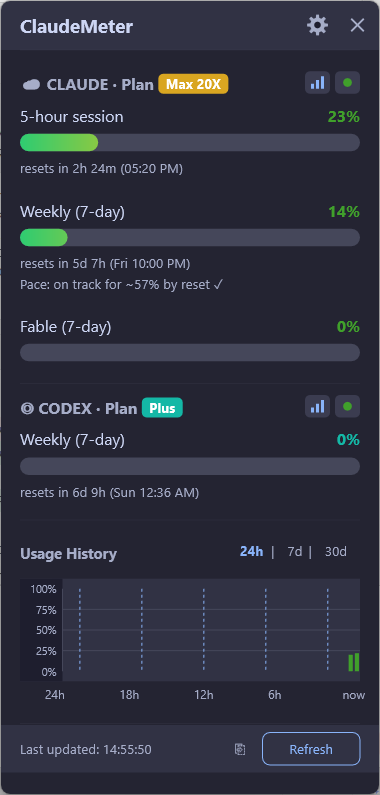
- Always visible — the tray icon shows your current usage at a glance; hover for the details.
- Every window — 5-hour, weekly and per-model limits, including new ones as Anthropic adds them.
- Alerts — native notifications when you cross the thresholds you choose.
- Pace & history — see whether you are on track to run out before the reset.
- Tiny footprint — native Rust, a single portable executable using under 10 MB of RAM, with no telemetry.
- Codex too — optional OpenAI Codex usage tracking side by side with Claude.
Set it up in a minute
- Sign in to Claude Code once, so its credentials exist on your computer.
- Download the latest ClaudeMeter release for Windows or macOS from GitHub Releases.
- Run it. The icon appears in the tray or menu bar and starts showing your limits right away.
Tips to avoid hitting the limit
- Start a new conversation instead of continuing a very long one — the whole history is processed with every message.
- Use a lighter model for simple tasks and save the heaviest model for work that needs it.
- In Claude Code, use
/compactor/clearwhen context grows large. - Plan heavy work around the reset time you see in your monitor rather than guessing.
FAQ
How long does the Claude usage limit last?
The session limit uses a rolling 5-hour window that starts with your first message. Weekly limits reset 7 days after their window starts. The exact reset time is shown in Claude's usage settings and in ClaudeMeter.
Do Claude Code and claude.ai share the same limit?
Yes. On Pro and Max plans, usage in claude.ai, the desktop app and Claude Code counts against the same subscription limits.
Does ClaudeMeter need an API key?
No. ClaudeMeter reads the credentials Claude Code already stores on your computer and queries the same usage endpoint Claude uses. No extra key is created and nothing is sent to third parties.
Is ClaudeMeter free?
Yes. ClaudeMeter is free and open source under the MIT license, for Windows 10/11 and macOS 12+.